Phantom Blade Zero shader compilation after patch 1.0302256
By DayOneFix Editorial · November 2, 2026
Work through these
0 / 3 doneTicks are saved on this device — close the page and pick up where you left off.
Update before treating -noraytracing as the default answer. S-GAME’s 4 November PC patch, version 1.0302256, changes startup shader compilation. The old launch-option workaround remains a historical player report, not a requirement for everyone on the new build.
Checked 5 November 2026: the official patch notes were read. The older community reports below were reviewed on November 2. We have not installed the game, timed a launch or tested particular GPUs.
After the patch, identify which case you have
| Previous state or action | What the publisher describes | Your next check |
|---|---|---|
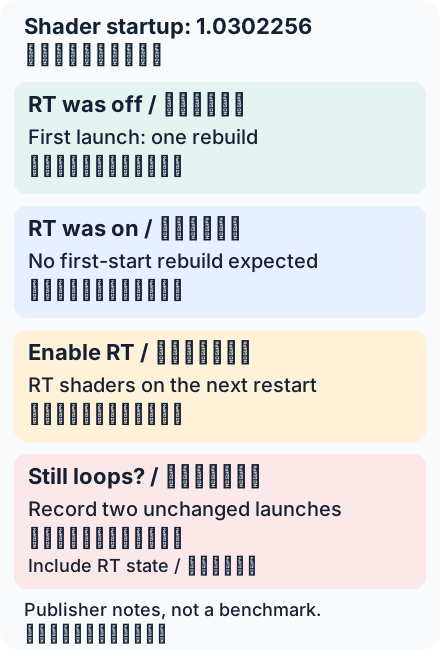
| Ray tracing was off before updating | A short, one-time compilation can occur on the first patched launch | Let it finish, exit normally and compare another unchanged launch |
| Ray tracing was on before updating | That first launch should not need recompilation | Record the build and settings if you see a different result |
| You enable ray tracing after updating | Its shaders are compiled on the next restart | Do not label this setting-triggered work an every-launch loop |
| Full compilation repeats without further changes | The expected one-time explanation does not account for the repeat | Record two launches, build, driver and RT state for support |
The patch stops compiling ray-tracing shaders by default at startup. That is why a first rebuild after updating and a repeated rebuild are different problems. The publisher describes shorter startup, but we do not turn that into invented seconds, a percentage gain or a guarantee for every PC.
The old launch option is now a fallback, not step one
In the historical discussion, a B580 user proposed -noraytracing; an A750 user and another participant reported success. This verifies what they posted, not their hardware outcome on the November patch. Reports also mention AMD and NVIDIA cards; the symptom is not proven Intel-only.
If you already added the option, save your existing Steam Launch Options before changing anything. Remove only -noraytracing if you want to test the updated game’s normal behavior; keep unrelated options. The flag disables ray tracing, so a faster start with it is not a free visual upgrade. Do not add it automatically to a patched installation just because an older guide lists it.
Cache cleanup: a specific post-update step
For crashes or stuttering after updating, the official notes now recommend clearing the game’s cache. Close the game, back up the cache first, and follow the publisher’s route: Steam Library → Manage → Browse local files → PBZ\ProjectPBZ\Saved\Cache. The instruction concerns files inside Cache, not deleting the entire Saved directory or saves. If your installation does not match the path, stop and use support.
Do not repeatedly clear caches to “fix” a normal first compilation: clearing them can itself require rebuilding. This is a publisher-scoped troubleshooting step, not a DayOneFix-tested universal cure. We did not delete files or change anyone’s PC.
Microsoft’s pipeline-cache reference supplies general driver/cache background, not a diagnosis of this game’s implementation.
Report a repeat that survives the update
Include the installed build, GPU, driver and Windows versions, RT state before/after the update, and what happened on two unchanged launches. Distinguish a full rebuild, a brief check, a frozen percentage and a crash. Use the official support route in the patch notes; omit passwords and private files.
The table and diagram are our decision framework. Patch behavior is attributed to S-GAME; historical results to players. No purchase, gameplay test, driver rollback, registry edit or security-setting change was performed.